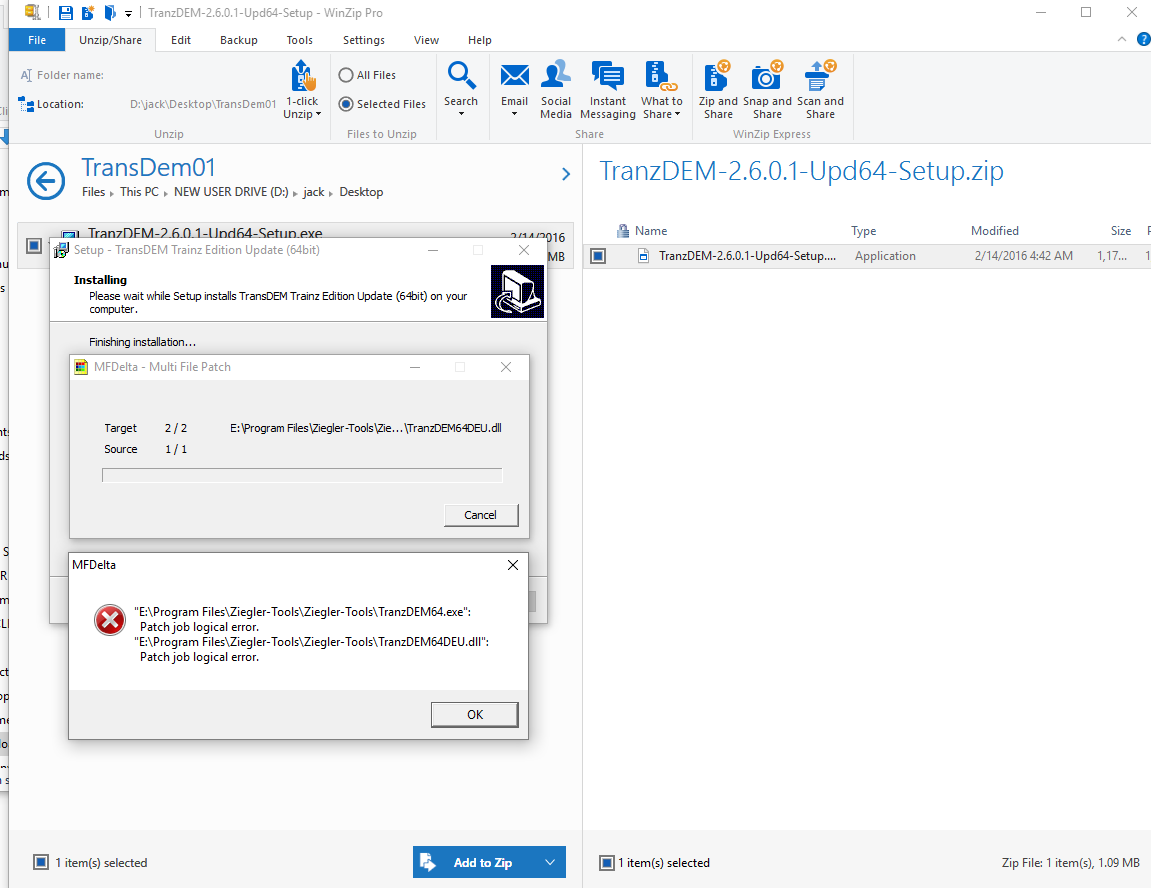
I have this problem. http://i1355.photobucket.com/albums/q70 ... haueda.png
any suggestions
Update 2.6.0.1
Re: Update 2.6.0.1
Is the folder where you are trying to install the update correct? Does the folder contain the 64 bit .exe and .dll for TransDEM 2.6.0.0?
![[IMG]http://i1355.photobucket.com/albums/q709/Jack_Drake/2016-02-19_0606_zpshfjxnjly.png[/img]](http://s1355.photobucket.com/user/Jack_Drake/media/2016-02-19_0606_zpshfjxnjly.png.html)
Re: Update 2.6.0.1
It appears you have a sub-folder also named "Ziegler-Tools" in "E:\Program Files\Ziegler-Tools". Which of the two did you enter as the target folder when installing the update?
Re: Update 2.6.0.1
You are correct I had /ziegler-tools/ziegler-tools.
Must be an old age thing.
Apologise for being a nuisance.
Must be an old age thing.
Apologise for being a nuisance.
Re: Update 2.6.0.1
G'day geophil,
Having had to use TransDEM for the first time, seriously, since installing the new update, Roland, I discovered a work flow change that differed from all previous versions, which has me intrigued. The 'project' involves the use of map clippings sourced from *.pdf files that have to be manually georeferenced - no problems there - but as I worked through the process, using the manual georeference tool ([CTRL}+[R]), it quickly became evident that TransDEM was asking me for the first point of reference in the south-west corner of the image (as normal), it would then request the north-east corner, followed by the south-east corner and finally (as the confirmation for the triangulation), the north-west corner. Although I quickly adapted to the altered work flow, this was completely different to that to which I had become accustomed after years of using the program (which started in the SW and worked logically to the SE, then the NE and finally the NW). Of course, everything worked as I expected it to do but I was intrigued as to the reason this should be so...
Jerker {:)}
Having had to use TransDEM for the first time, seriously, since installing the new update, Roland, I discovered a work flow change that differed from all previous versions, which has me intrigued. The 'project' involves the use of map clippings sourced from *.pdf files that have to be manually georeferenced - no problems there - but as I worked through the process, using the manual georeference tool ([CTRL}+[R]), it quickly became evident that TransDEM was asking me for the first point of reference in the south-west corner of the image (as normal), it would then request the north-east corner, followed by the south-east corner and finally (as the confirmation for the triangulation), the north-west corner. Although I quickly adapted to the altered work flow, this was completely different to that to which I had become accustomed after years of using the program (which started in the SW and worked logically to the SE, then the NE and finally the NW). Of course, everything worked as I expected it to do but I was intrigued as to the reason this should be so...
Jerker {:)}
Re: Update 2.6.0.1
Yes, I have changed the recommended order. It's mentioned in the release notes and in the documentation proper. Swapping second and third point will often lead to quicker conversion of the transformation parameters. But it remains to be just a recommendation, as before. If you want the previous behaviour, uncheck "Manual georeferencing in diagonal order" in the "General" tab in Settings.
Mathematical background: The points you enter determine a so-called affine transformation. We need six equations to find six unknowns. The unknowns are: x and y translation (simple shift), x and y scaling, rotation and skew (a trapezoidal deformation). With each point we create two equations, one for x and one for y.
With the first point, we can find only two unknowns, these are x and y translation (shift). With the second point we can find two more unknowns, namely rotation and (uniform) scaling (same for x and y). The third point then refines scaling and rotation, by finding the last two unknowns, and adds skew. The first and the second point are the most important ones. Placing the second point diagonally from the first provides a better clue for the y component and therefore the preset for the third point will become more accurate. However, once all three points have been set the end result for the parameters will be exactly the same as with the old order. (The fourth point is always for verification only. It cannot be set and does not contribute to the parameters.)
In practice, you may need fewer adjustments to the preset, which will make manual georeferencing slightly quicker. And that was the reason for changing the recommendation.
Mathematical background: The points you enter determine a so-called affine transformation. We need six equations to find six unknowns. The unknowns are: x and y translation (simple shift), x and y scaling, rotation and skew (a trapezoidal deformation). With each point we create two equations, one for x and one for y.
With the first point, we can find only two unknowns, these are x and y translation (shift). With the second point we can find two more unknowns, namely rotation and (uniform) scaling (same for x and y). The third point then refines scaling and rotation, by finding the last two unknowns, and adds skew. The first and the second point are the most important ones. Placing the second point diagonally from the first provides a better clue for the y component and therefore the preset for the third point will become more accurate. However, once all three points have been set the end result for the parameters will be exactly the same as with the old order. (The fourth point is always for verification only. It cannot be set and does not contribute to the parameters.)
In practice, you may need fewer adjustments to the preset, which will make manual georeferencing slightly quicker. And that was the reason for changing the recommendation.
Re: Update 2.6.0.1
G'day geophil,
...Roland, thank you for the explanation. I must have missed that in the notes, no matter. As I said, I adapted quickly to the new method. However, although I can't ascertain that which you refer to as ..."...the preset..."..., I do not think that the method can actually be quicker (it may well be perceived to be so), as there is an extra 'move' over the map required in the 'new' method that isn't in the old (at least, the way I do it, there is). I start - after 'patching' the clipping and pressing [CTRL[+[R] - by zooming in to a level (usually about 3x [F2] presses) to a level sufficient for the accuracy I require, so that I am already located in the SW corner to enter the selected first point's co-ordinates. Using the 'new' method, I now grab the horizontal scroll bar and move directly to the eastern side of the map and the vertical scroll bar to get to the NE corner and enter the co-ordinates of the third reference point, after clicking on the appropriate point - in the 'old' method, there is only the horizontal movement to the eastern extent of the map required to enter the second reference point. I then make the 'move' south (using the vertical scroll bar) to enter the second reference point - in the 'old' method, a single move northward from the SE corner gets me to the NE corner, to enter the third reference point. In the new metjod, I now have to move back to the NE corner (vert6ically: this is the extra 'move')) and horizontally to reach the NW corner to complete the method - as I am already in the NE corner, in the 'old' method, I only need to move directly (horizontally) to the NW corner to complete the georeferencing. To simplify things, with the new method, that makes the movements across the map thus; SW to NE (2 'moves'), NE to SE (1 'move') and SE to NW (2 'moves'), for a total of 5 'moves', whilst in the 'old' method, it goes SW to SE (1 'move'), SE to NE (1 move) and from the NE corner to the NW corner (1 'move'), for a total count of 3 'moves', which is actually 2 'moves' less (rather than the 1 that my initial thoughts determined). Either way, without an actual timed comparison between the two methods (which I do not believe would be 'tenable' because of too may variables between the moves), the entire matter is only ever going to be subjective, no matter which way you "look at it". I shall carry on regardless. As you say, if I find that the 'new' method is not suitable for me, I can always go back to the 'old' way...
Jerker {:)}
...Roland, thank you for the explanation. I must have missed that in the notes, no matter. As I said, I adapted quickly to the new method. However, although I can't ascertain that which you refer to as ..."...the preset..."..., I do not think that the method can actually be quicker (it may well be perceived to be so), as there is an extra 'move' over the map required in the 'new' method that isn't in the old (at least, the way I do it, there is). I start - after 'patching' the clipping and pressing [CTRL[+[R] - by zooming in to a level (usually about 3x [F2] presses) to a level sufficient for the accuracy I require, so that I am already located in the SW corner to enter the selected first point's co-ordinates. Using the 'new' method, I now grab the horizontal scroll bar and move directly to the eastern side of the map and the vertical scroll bar to get to the NE corner and enter the co-ordinates of the third reference point, after clicking on the appropriate point - in the 'old' method, there is only the horizontal movement to the eastern extent of the map required to enter the second reference point. I then make the 'move' south (using the vertical scroll bar) to enter the second reference point - in the 'old' method, a single move northward from the SE corner gets me to the NE corner, to enter the third reference point. In the new metjod, I now have to move back to the NE corner (vert6ically: this is the extra 'move')) and horizontally to reach the NW corner to complete the method - as I am already in the NE corner, in the 'old' method, I only need to move directly (horizontally) to the NW corner to complete the georeferencing. To simplify things, with the new method, that makes the movements across the map thus; SW to NE (2 'moves'), NE to SE (1 'move') and SE to NW (2 'moves'), for a total of 5 'moves', whilst in the 'old' method, it goes SW to SE (1 'move'), SE to NE (1 move) and from the NE corner to the NW corner (1 'move'), for a total count of 3 'moves', which is actually 2 'moves' less (rather than the 1 that my initial thoughts determined). Either way, without an actual timed comparison between the two methods (which I do not believe would be 'tenable' because of too may variables between the moves), the entire matter is only ever going to be subjective, no matter which way you "look at it". I shall carry on regardless. As you say, if I find that the 'new' method is not suitable for me, I can always go back to the 'old' way...
Jerker {:)}