I have completed exporting my route into Trainz. I used the eye altitude of 5.0 m. I got an error of "One or more rater maps open have a scale larger than 1 pixel to 2.5m". From what I have read this means the Eye Altitude from Google is too close to the ground. I mentioned before that my route is in Trainz already. I have since gone back into Google to bring the eye altitude to 5.0 km My question is can I go back and adjust the altitude to higher Georeferenced Raster Map then go back with the original DEM's I used and use the original STR route file I used to generate the first route? If I can do I have to do anything different in merging the 3 together???
Thanks for any help!!
Bruce
Google Earth Images
Re: Google Earth Images
The message does not mean too close, just close. For ortho imagery in general, you always have to use a rather large scale to recognize any features on the photos. The problem is not scale itself, it's the Trainz ground texture limitation which will let aerial images appear blurred. Larger scale images should go to UTM tiles, not to ground textures. That's what this warning is about.
For ground textures I always recommend a map, either from a Map Tile provider or, for the US, the USGS 1:24 topo map, available via WMS.
Now, in TransDEM you can always add new maps or images at any scale. However, once you have generated the Trainz route from TransDEM, you can not change the ground textures there.
So, changing the sources for ground textures in TransDEM and wishing them to appear in the Trainz route means that you have to re-generate the route, with DEM, georeferenced maps/images and vector data.
For ground textures I always recommend a map, either from a Map Tile provider or, for the US, the USGS 1:24 topo map, available via WMS.
Now, in TransDEM you can always add new maps or images at any scale. However, once you have generated the Trainz route from TransDEM, you can not change the ground textures there.
So, changing the sources for ground textures in TransDEM and wishing them to appear in the Trainz route means that you have to re-generate the route, with DEM, georeferenced maps/images and vector data.
-
brucemarshall56
- Posts: 19
- Joined: 17 Sep 2012 22:14
Re: Google Earth Images
Geophil,
I have used USGS The National Map Viewer for my DEM's, are these OK to use? I have used Google Earth for the Images, I have traced the route that I got from Google Earth for the vector data. If any of these are not OK what would you recommend???
I should have been using UTM tiles to export to trainz?
I am going to try to use the USGS 1:24 topo map, available via WMS. today.
What tutorial should I use for the UTM tiles?
Thanks for the help!!
Bruce
I have used USGS The National Map Viewer for my DEM's, are these OK to use? I have used Google Earth for the Images, I have traced the route that I got from Google Earth for the vector data. If any of these are not OK what would you recommend???
I should have been using UTM tiles to export to trainz?
I am going to try to use the USGS 1:24 topo map, available via WMS. today.
What tutorial should I use for the UTM tiles?
Thanks for the help!!
Bruce
Re: Google Earth Images
These should all be OK, with the constraint that I would not recommend aerial images for ground textures because of the blurry result, see above.brucemarshall56 wrote:I have used USGS The National Map Viewer for my DEM's, are these OK to use? I have used Google Earth for the Images, I have traced the route that I got from Google Earth for the vector data. If any of these are not OK what would you recommend???
See tutorials 4 and 7 in the TransDEM main manual for an introduction.brucemarshall56 wrote:I am going to try to use the USGS 1:24 topo map
The "Muengsten" tutorial in the TransDEM Trainz manual, part 2, page 50.brucemarshall56 wrote:I should have been using UTM tiles to export to trainz?
What tutorial should I use for the UTM tiles?
And make sure the DEMs cover all of your route. That sample you sent me earlier was quite a small one, something like just 1000m x 500m.
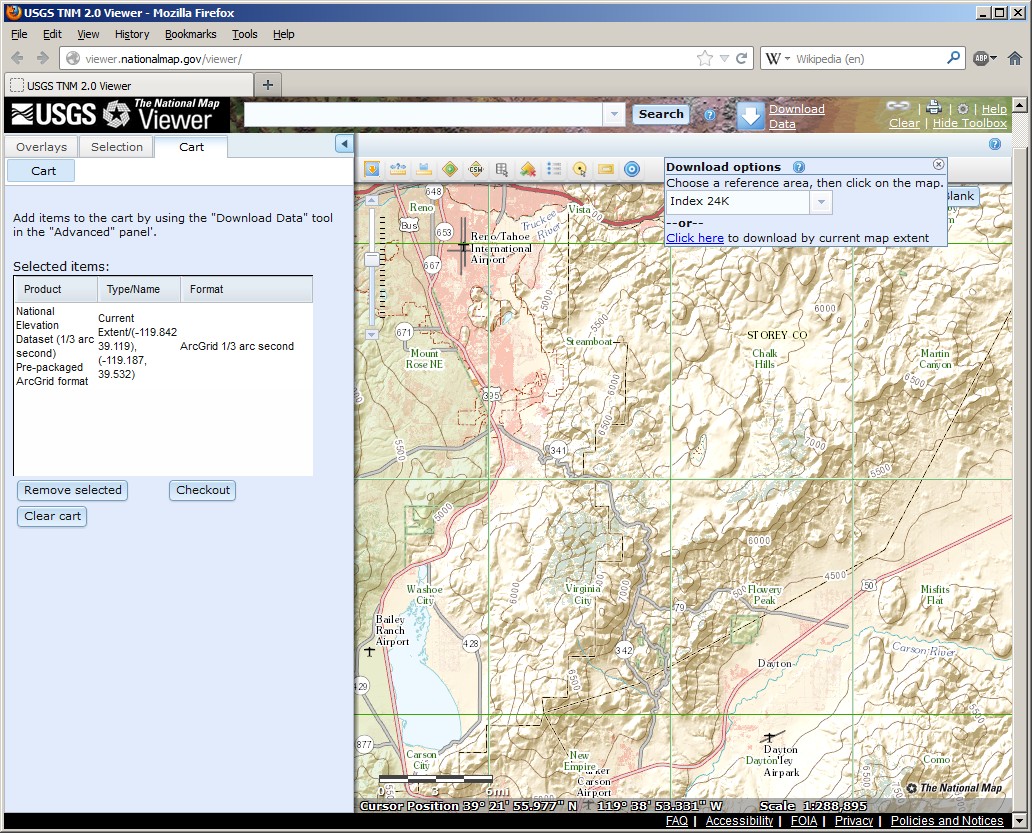
If you need additional areas, please note that The National Map has changed this week. GeoTIFF is no longer. Select "Arc Grid" instead when choosing the DEM file format. As as data is pre-packaged now, downloads will be huge.
Important: You need to install the TransDEM 2.3.1 update from my website, see here, for this DEM format.
-
brucemarshall56
- Posts: 19
- Joined: 17 Sep 2012 22:14
Re: Google Earth Images
Geophil,
I will try the things you mentioned above. You're point on the DEM's being to small, that is what I got from the National Map Viewer! Should I be looking elsewhere?? I am going to try to use the USGS 1:24 topo map sometime today. The DEM's I downloaded covered all of the Virginia & Truckee from Virginia City to Carson City. When I exported to Trainz, I can recognize the area but it is not real defined.
When I exported to Trainz I used the steps starting on page 45, Tutorial 1, Part 1 all the way thru to Part 5, am I on the right track (no pun intended)???
Today I went into my route I had already exported into trainz and have no idea how to get the google images to be on the baseboard, the images are floating in the air. I tried to adjust the height by using the Adjust Height tab in trainz, then finding the corresponding UTM, nothing happened. What am I doing wrong?????
Also today, I did try another DEM from the The National Map Viewer with the updated information you mentioned in your last reply. It
looks like I would have to recreate new images & vector data with the higher eye altitude, because when I went to export the program said there were errors in the old files and would not be included.
Again many thanks for you help.
Bruce
I will try the things you mentioned above. You're point on the DEM's being to small, that is what I got from the National Map Viewer! Should I be looking elsewhere?? I am going to try to use the USGS 1:24 topo map sometime today. The DEM's I downloaded covered all of the Virginia & Truckee from Virginia City to Carson City. When I exported to Trainz, I can recognize the area but it is not real defined.
Another question I have is: I have take Google Earth Images from 5.0 km. Now I have to go back and get new DEM's? And a new vector route using the Google Earth Images from 5.0 km?So, changing the sources for ground textures in TransDEM and wishing them to appear in the Trainz route means that you have to re-generate the route, with DEM, georeferenced maps/images and vector data.
When I exported to Trainz I used the steps starting on page 45, Tutorial 1, Part 1 all the way thru to Part 5, am I on the right track (no pun intended)???
Today I went into my route I had already exported into trainz and have no idea how to get the google images to be on the baseboard, the images are floating in the air. I tried to adjust the height by using the Adjust Height tab in trainz, then finding the corresponding UTM, nothing happened. What am I doing wrong?????
Also today, I did try another DEM from the The National Map Viewer with the updated information you mentioned in your last reply. It
looks like I would have to recreate new images & vector data with the higher eye altitude, because when I went to export the program said there were errors in the old files and would not be included.
Again many thanks for you help.
Bruce
Re: Google Earth Images
Until last week you defined your download area by map extent. I guess you zoomed in a bit too far, to get such a small area. However, from now on, National Map Viewer will always offer you entire 1 x 1 degree chunks, so small DEMs will no longer happen.brucemarshall56 wrote:Geophil,
I will try the things you mentioned above. You're point on the DEM's being to small, that is what I got from the National Map Viewer!
No, the National Map Viewer is still quite right.Should I be looking elsewhere??
Even if is does not show the track of the recently rebuilt section, it is still a better ground texture then aerial images. The only map that shows the rebuilt part of the line seems to be Google (Map Tiles).I am going to try to use the USGS 1:24 topo map sometime today.
DEMs, maps, aerial images and vector route are all completely independent of each other. That's the big advantage of georeferenced data. Since each bit of geo data carries its position and scale, it can be combined in an arbitrary manner. So you you only need to update/replace the parts that are not yet good enough.Another question I have is: I have take Google Earth Images from 5.0 km. Now I have to go back and get new DEM's? And a new vector route using the Google Earth Images from 5.0 km?
In the TransDEM Trainz manual. Yes, that's the right one to begin with. For dealing with Map Tiles and WMS, refer to the the tutorials 4 and 7 in the TransDEM main manual.When I exported to Trainz I used the steps starting on page 45, Tutorial 1, Part 1 all the way thru to Part 5,
Select the "Adjust Height" tool in Trainz Surveyor, position the cursor above a UTM tile, press left mouse button and drag. This should raise or lower the tile.Today I went into my route I had already exported into trainz and have no idea how to get the google images to be on the baseboard, the images are floating in the air. I tried to adjust the height by using the Adjust Height tab in trainz, then finding the corresponding UTM, nothing happened.
(In mountainous terrain it may be helpful to create 500 m tiles instead of the default 1000m tiles, because the smaller ones may be easier to handle.)
The National Map Viewer should offer you a single NED DEM product, 1 or 1/3 arc sec (n40w120). This one file should cover the entire V&T.Also today, I did try another DEM from the The National Map Viewer with the updated information you mentioned in your last reply. It
looks like I would have to recreate new images & vector data with the higher eye altitude, because when I went to export the program said there were errors in the old files and would not be included.
Which tool reports errors?
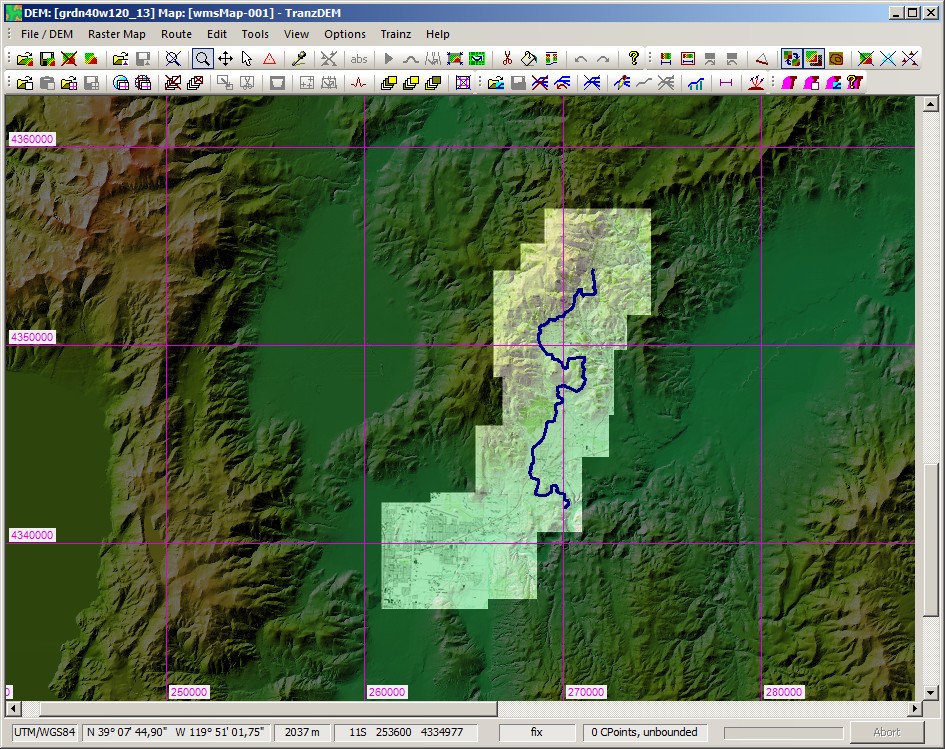
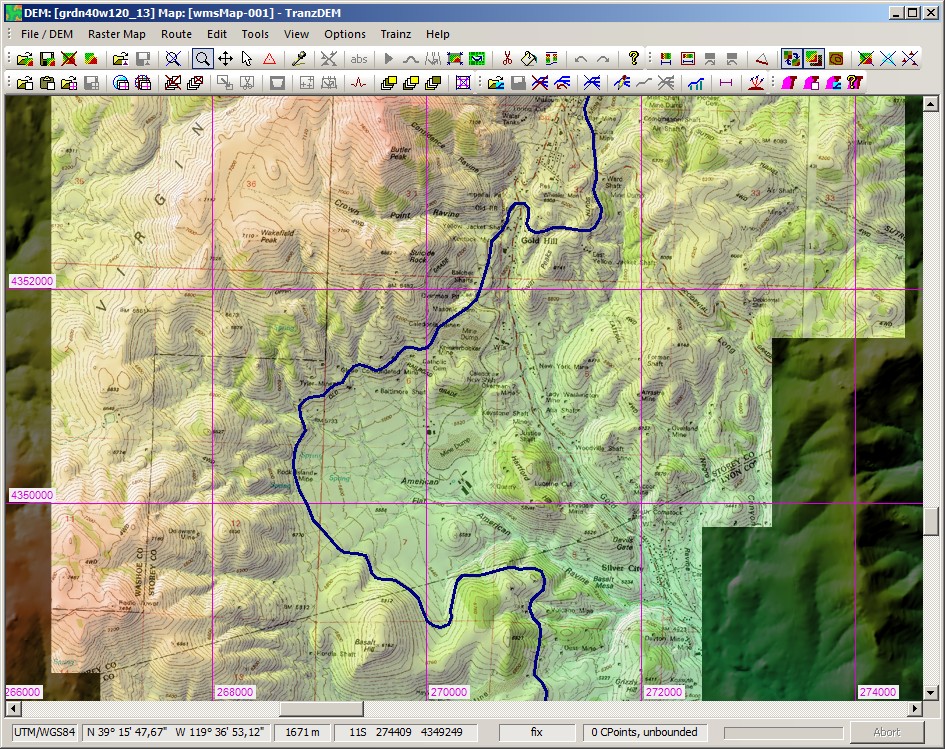
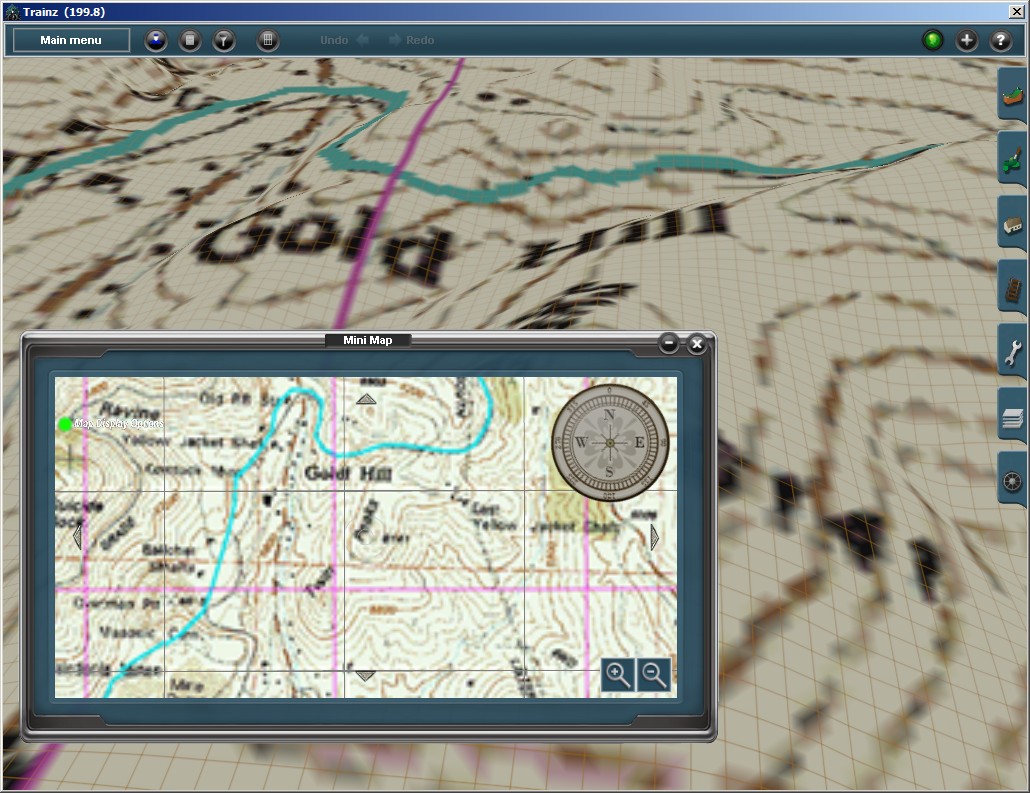
I played around myself with this area today. Here is what I get.
Obtain the DEM:
DEM + WMS topo maps. Route traced from Google Maps (Map Tiles)
Zoomed-in to Gold Hill:
Exported to Trainz, Gold Hill with mini-map:
-
brucemarshall56
- Posts: 19
- Joined: 17 Sep 2012 22:14
Re: Google Earth Images
Geophil,
I have successfully gotten a DEM using the National Map Viewer and you were right it did encompass the entire route. I gotten all the images using Map Tile Server, and have polylined the route. When I load the DEM it seems to have the image files behind the DEM, or so it would seem. I have tried down loading the DEM again but it still seems of have the Georeferenced Raster Maps behind the DEM.
Any help would be appreciated!
Bruce
I have tried to include a screen shot of what I have, but I can not seem to attach to this e-mail.
I have successfully gotten a DEM using the National Map Viewer and you were right it did encompass the entire route. I gotten all the images using Map Tile Server, and have polylined the route. When I load the DEM it seems to have the image files behind the DEM, or so it would seem. I have tried down loading the DEM again but it still seems of have the Georeferenced Raster Maps behind the DEM.
Any help would be appreciated!
Bruce
I have tried to include a screen shot of what I have, but I can not seem to attach to this e-mail.
Re: Google Earth Images
You may have activated "Hide Raster Maps" ("View" menu, last entry), or Ctrl+T, also an icon on the toolbars.
-
brucemarshall56
- Posts: 19
- Joined: 17 Sep 2012 22:14
Re: Google Earth Images
Geophil,
Thanks for the info! I had to have hit the wrong key. Will try what you suggested.
Thanks again, Happy New Year!!
Bruce
Thanks for the info! I had to have hit the wrong key. Will try what you suggested.
Thanks again, Happy New Year!!
Bruce
-
brucemarshall56
- Posts: 19
- Joined: 17 Sep 2012 22:14
Re: Google Earth Images
Geophil,
I have gone in and checked and I did not have the Hide Raster Maps checked. I loaded the DEM for the area and it loads with a blank Raster Map from what I can see. Am I using the correct DEM file to load the DEM?? After I unzip the file there are quite a few files, which one should I be using? Upon clicking on Open DEM the following files are my choices:
Size
w001001x--which is a ADF File 465 KB
W001001---which is a ADF File 475952 KB
sta---------which is a ADF File 1 KB
prj----------which is a ADF File 1 KB
hdr---------which is a ADF File 1 KB
dblbnd------which is a ADF File 1 KB
I must say I have not had this problem until now. Any suggestions??
The Muengsten tutorial says on page 45 of the manual that we open DEM, Georefenced Raster Map then the Vector Route is that the order they have to be in or does it matter?????
Bruce
I have gone in and checked and I did not have the Hide Raster Maps checked. I loaded the DEM for the area and it loads with a blank Raster Map from what I can see. Am I using the correct DEM file to load the DEM?? After I unzip the file there are quite a few files, which one should I be using? Upon clicking on Open DEM the following files are my choices:
Size
w001001x--which is a ADF File 465 KB
W001001---which is a ADF File 475952 KB
sta---------which is a ADF File 1 KB
prj----------which is a ADF File 1 KB
hdr---------which is a ADF File 1 KB
dblbnd------which is a ADF File 1 KB
I must say I have not had this problem until now. Any suggestions??
The Muengsten tutorial says on page 45 of the manual that we open DEM, Georefenced Raster Map then the Vector Route is that the order they have to be in or does it matter?????
Bruce