Page 1 of 2
Assistance shp-file
Posted: 23 May 2011 10:49
by Belgian46
Hello to All,
Would someone give me some assistance with the following :
1) Verify a route ( shp.file ) within Transdem
2) Give me the result of your test.
Thank you for your cooperation
Best regards
Kurt
ps : URL of SHP file =
http://dl.dropbox.com/u/19070177/railways84.shp
If you need the DEM-file ( = 79MB ) -
http://dl.dropbox.com/u/19070177/N51_50 ... rged_t.dem
I also have a MKR-file ( not correctly positioned - but with this file I have no problem viewing it in Transdem)
Re: Assistance shp-file
Posted: 24 May 2011 11:34
by Jerker
G'day Kurt,
I get the following result upon any attempt to load the *.shp file..
"Errors reading file "railways82.shp"
...although the DEM file downloaded and displayed without issue...
...I can only conclude that there is some issue with the *.shp file, making it unreadable in TransDEM...
Jerker {:)}
Re: Assistance shp-file
Posted: 24 May 2011 12:51
by Belgian46
Hello Jerker,
Thank you for your assistance - much appreciated.

Will try to figure out what is wrong with the shp.file
Best regards
Kurt
Re: Assistance shp-file
Posted: 24 May 2011 13:31
by geophil
The ESRI Shape format requires two files: .shp and .shx. Perhaps the .shx is missing?
Re: Assistance shp-file
Posted: 24 May 2011 21:03
by Belgian46
Re: Assistance shp-file
Posted: 25 May 2011 08:36
by geophil
Hello Kurt,
this looks good now.
Even the Kusttram is there.
Re: Assistance shp-file
Posted: 25 May 2011 11:48
by Belgian46
Hello Geophil,
I also managed to get the shp-file into Transdem viewable.
I noticed that the shp-file needs to be corrected - also a new item for me. I didn't create the files attached in my previous reply to this thread
As I didn't knew that the kusttramroute was in the shp-file, I already had made a creation of the Kusttramroute (Depanne to Knokke ) via Google Earth. However, I have to review this file, because I only used points and no lines.
I also had contact with NGI ( National Geographic institute - Brussel ). The NGI can deliver ( price unknown ) a digital card of Belgium ( in non-compressed tiff format ). With the tiff-file there is also a tfw-file, which allows georeference of the tiff-file. I probably will need to visit the NGI, to have a better picture of the situation (

)and also to have a look if other possibilities are available.
Wth Gimp ( open source ) I tried merging a national map of Belgium and the complete Belgian railroad. ( pictures in PNG-format non-geographically placed ). No success up to now.
I will also try to import the belgian railroad picture into Google earth. Also not quite easy to do, if you are non-experienced user.

Also learned the lesson, that several programs are not always compatible with each other

Best regards
Kurt
Re: Assistance shp-file
Posted: 26 May 2011 13:40
by geophil
Belgian46 wrote:
As I didn't knew that the kusttramroute was in the shp-file, I already had made a creation of the Kusttramroute (Depanne to Knokke ) via Google Earth. However, I have to review this file, because I only used points and no lines.
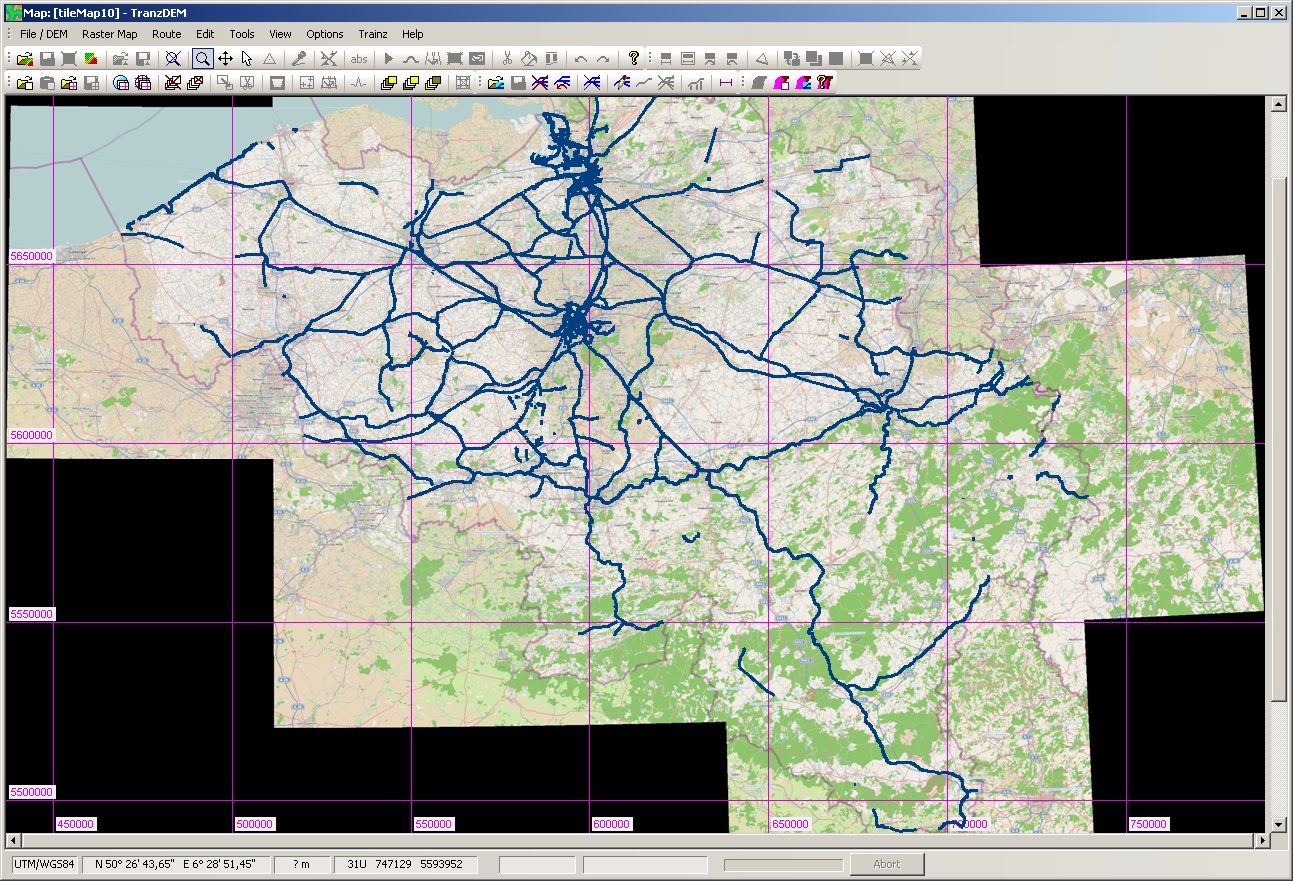
There seem to be a few missing links in the network. Result of editing?
This is what I get, drawn on top of the OSM map at zoom level 10:
I also had contact with NGI ( National Geographic institute - Brussel ). The NGI can deliver ( price unknown ) a digital card of Belgium ( in non-compressed tiff format ). With the tiff-file there is also a tfw-file, which allows georeference of the tiff-file. I probably will need to visit the NGI, to have a better picture of the situation (
)and also to have a look if other possibilities are available.
Do they offer GeoTIFF? tfw, a TIFF world file, is a non-standardised approach of adding georeferencing information to a TIFF raster map. GeoTIFF would be the standardised form.
Wth Gimp ( open source ) I tried merging a national map of Belgium and the complete Belgian railroad. ( pictures in PNG-format non-geographically placed ). No success up to now.
Don't try that. You are attempting to approximate geo coordinate transformations with 2D imaging transformations. This will only work for very small areas. For larger areas you will introduce a lot of distortion.
I will also try to import the belgian railroad picture into Google earth. Also not quite easy to do, if you are non-experienced user.
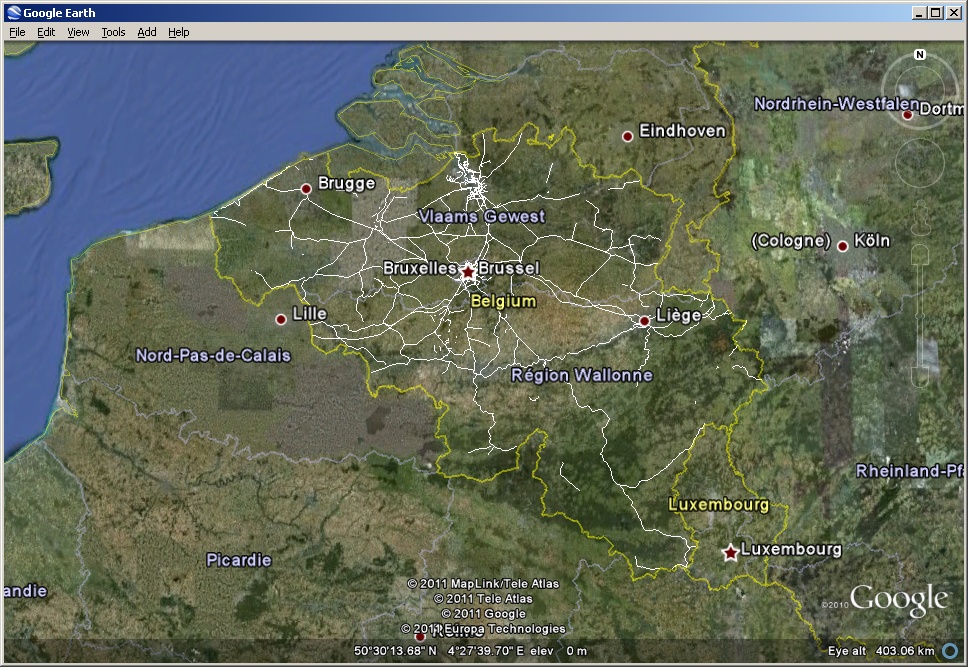
Easy. Export your shp file from TransDEM in kml format and open in Google Earth. You will get something like this:
Re: Assistance shp-file
Posted: 27 May 2011 18:44
by Belgian46
Hallo Geophil,
Thank you for your assistance.
1. The shp.file, which I didn't create, doesn't contain the full Belgian railway routes. Some lines are missing or not complete.
As I don't know how to correct a shp.file, I have, I think two options
a. start a new one. Only method I have found up to now is - create it in Google earth and then use kml2shp ( via
http://www.zonums.com )
b. correct the shp.file within Transdem
c. When making the raster map in Transdem with OSM ( zoom 10 ) and entering the shp.file, I then went further, I opened my dem-file, opened the raster map and opened the route ( shp.file ).
I wanted to create a new map with dem elevations.
This was not successfull - it took several hours before the operation ended, and as final result I received error writing section to .gnd file. A creation of 343 North South baseboards and 408 east west baseboards is probably to much.
2. The NGI didn't mention Geotiff. They deliver the tiff + tfw seperately. I don't know how to combine the two files.
3. I also tried some experiments with the option overlay image ( with the picture of the Belgian railway network ) in Google Earth. This gives me also a possibility.
Best regards
Kurt
Re: Assistance shp-file
Posted: 28 May 2011 17:00
by geophil
Belgian46 wrote:1. The shp.file, which I didn't create, doesn't contain the full Belgian railway routes. Some lines are missing or not complete.
b. correct the shp.file within Transdem
Yes, that's an option. [/quote]
This was not successfull - it took several hours before the operation ended, and as final result I received error writing section to .gnd file. A creation of 343 North South baseboards and 408 east west baseboards is probably to much.
It is, indeed. Even if TransDEM would have succeeded, Trainz Content Manager would have failed or refused. You will need much smaller modules. In a country with a dense railway network like Belgium I would go for modules about 30 km in length. You can always merge in Surveyor, seamlessly.
2. The NGI didn't mention Geotiff. They deliver the tiff + tfw seperately. I don't know how to combine the two files.
Is this a topographic map? What is the scale? Is it worth to bother? What more important information would you get which is not in the OSM map?
Concerning the world file "tfw", this is usually plain text. Normally it gives the lat/long for the top left corner (NW) and also the spacing per pixel. The tags to denote these parameters are not standardised. It can be used with TransDEM for manual geo-referencing, but needs minimal arithmetic math by the user as TransDEM expects the SW and NE corner for the diagonal corner method. Most world files do not give the geodetic datum or the geo coordinate system if projected and not geographic. That's the difference to GeoTIFF which has a number of predefined tags and values within the TIFF file to specify all the georeferencing. Which does not mean GeoTIFF always works.