Page 1 of 1
Question: How to install OSM API Key?
Posted: 29 Dec 2021 13:11
by DmitryKz
Hi.
I registered on the thunderforest.com and received the API key.
Full URL with it looks like this:
Code: Select all
https://tile.thunderforest.com/outdoors/{z}/{x}/{y}.png?apikey=myapikeymyapikeymyapikeymyapikey
Now I don’t understand how to enter it in TransDEM?
I can enter the API key into the appropriate dialog box.
But I can't press the OK button in the URL Composition window.
I would appreciate for help.
Re: Question: How to install OSM API Key?
Posted: 29 Dec 2021 16:24
by geophil
Well, for OSM you don't need a key. The parameters for OSM map tile access are included in the sample settings. And Open Topo Map, the alternative renderer for OSM, is also part of those settings.
If you want to try out some other map tile data source that requires am API key, it has to match the concept that works for Google maps and Microsoft Bing maps. If it does, you should create your settings following the examples for Google and Bing. But I have to admit, I never tried this myself with other providers.
Re: Question: How to install OSM API Key?
Posted: 29 Dec 2021 19:37
by DmitryKz
I am trying to render the terrain above 60°N.
I would like to be able to load tiles from OSM Thunderforest Outfoors, which have isolines with numbers indicating the height of the terrain.
This requires an API key.

For example, the screenshot above is from SAS.Planet, which also uses its own API key.
I tried to add a description of the server based on the OSM records, since apparently their settings are similar, except that OSM does not require an API, but OSM Thunderforest does. The watermark appears only in the preview window and in the loaded tile.
Code: Select all
    <URL name="Thunderforest" guid="5f635350-8f50-408e-b422-857ffc03c633" addr="https://tile.thunderforest.com" prefix="outdoors/" standalone="1" type="6" postfix=".png" >
      <Matrix order="2" prefixClm="/" prefixRow="/" minZoom="1" maxZoom="18" />
      <Mercator origLat="90" origLon="-180" signLat="-1" signLon="1" projection="4" />
    </URL>

I tried adding the API key information as well (and API Key value in the file
WebTileMapServerKeys.xml of course), but in this case nothing loads, just a black screen in the preview window.
Code: Select all
    <URL name="Thunder" guid="5f635350-8f50-408e-b422-857ffc03c633" addr="https://tile.thunderforest.com" prefix="outdoors/" standalone="1" type="6" postfix=".png" apikey="1">
      <Matrix order="2" prefixClm="/" prefixRow="/" minZoom="1" maxZoom="18" />
	   <ApiKey prefixKey="?apikey=" />
      <Mercator origLat="90" origLon="-180" signLat="-1" signLon="1" projection="4" />
    </URL>
Maybe you can just show me which record I need to enter for API Key in xml-file? It seems to me that this task should be quite trivial?
Re: Question: How to install OSM API Key?
Posted: 29 Dec 2021 21:55
by geophil
It seems that API keys in the TransDEM map tile client are only supported for the Bing/Google REST-style interfaces. We can emulate map tiles this way but these APIs are not addressing quad-trees.
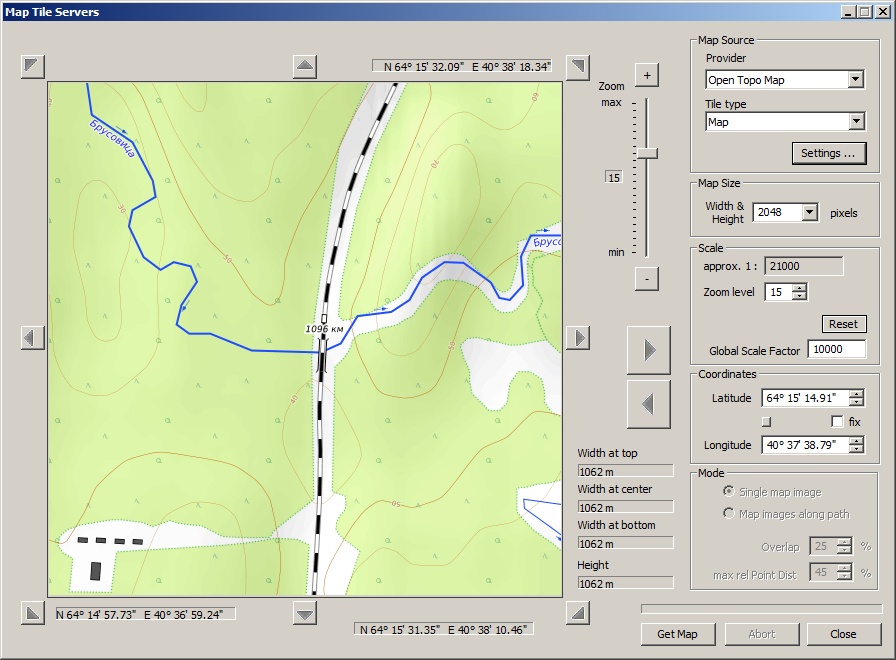
However, if you want to see contour lines, Open Topo Map has them as well:
Re: Question: How to install OSM API Key?
Posted: 29 Dec 2021 22:44
by DmitryKz
Wow. I didn't see what's under my nose.
Thank you. Happy New Year)