Page 1 of 1
...new issue with National Map downloads...
Posted: 03 Jun 2013 18:29
by Jerker
G'day geophil,
I hate to be a nuisance, yet again, Roland but I am having further difficulties with my latest attempts to download DEM data from the National Map Viewer. Following the instructions, which I have done may times before with great success, I now find myself confronted with 'your' (read TransDEM's) "DEM Operation Aborted Error" every time I get to that stage of the process. I can download the files from the viewer, without incident, I can extract them without incident (using both Winrar and 7Zip) and in both cases end up with files of suitable size with all 5 required files in the extracted folder but as soon as (immediately) I click the [OK] button after accepting the default resolution (having attempted to load the DEM in the usual manner), I receive the noted message and things go no further...
...I have tried several attempts at reloading already downloaded files and further attempts to download the same files again (all without apparent issues), on the assumption that the download was faulty, which seemed to have no effect, so I was wondering if you might (when you have a few spare moments) try opening at least one of the three files that are at the other end of this links...
http://gisdata.usgs.gov/TDDS/DownloadFi ... &dlpre=1-1
http://gisdata.usgs.gov/TDDS/DownloadFi ... &dlpre=1-1
http://gisdata.usgs.gov/TDDS/DownloadFi ... &dlpre=1-1
...to see if you suffer the same fate as I (even though, of course, I know this is going to be a futile exercise, because everything is going to work perfectly at your end)...
Jerker {:(}
Re: ...new issue with National Map downloads...
Posted: 03 Jun 2013 19:11
by geophil
Garry, these files are huge. After reading the file data into memory, TransDEM shows the import dialog. The moment you click OK, TransDEM allocates new memory for the DEM conversion into UTM coordinates. Using the suggested resolution, this will more than duplicate the required memory.
Are you running TransDEM on a 64bit or on a 32bit Windows system? If on a 32bit system you my exceed available process memory unless you tweak the system to allow 3GB per process.
Re: ...new issue with National Map downloads...
Posted: 03 Jun 2013 19:35
by SharkNose
Jerker,
I have been following your lack of success for some time now and I wish there was something I could do to help you out. I downloaded the first file from your post above and this is the file size of the downloaded file (from the properties) 395,641,156 bytes. This is the Size and not Size on disk. Your results should match that. Another thing you should do when you are in the properties is at the bottom, if there is a security area, click the "Unblock" button and "Apply" or "OK". Some programs will not work properly if it thinks Windows is still blocking the safety of the file.
I then unzipped the file with the standard Windows "Extract" when right-clicking on the zip file. I am running 64-bit Windows Enterprise (at work) - 16.0 GB memory. I opened TransDEM 2.3.1.1 and chose "Open DEM" and used the "w001001.adf" (the really big one) file to open the DEM. The dialog mentioned x and y resolution of 0.33", converted to UTM at both edges of x: 8m and y: 10m. I took the New Grid Width default of 10m and hit "OK".
And now the part you won't want to hear: After about 30 seconds TransDEM displayed the map successfully. If I'm not mistaken it looks like the Appalachian Mountains east of Altoona, PA. I forget your machine specs, but as geophil says it may be you are running out of memory.
I hope these details help you to a solution.
Andrew
Re: ...new issue with National Map downloads...
Posted: 04 Jun 2013 02:44
by Jerker
G'day geophil & Sharknose,
...I thank you both for your assistance in this matter. Regrettably, I am running an older 32 bit system (under Windows XP) that is only set up for the standard 2 GB of Physical Memory (even though the hardware is fitted with 4 GB). I have not set it up according to your instructions, Roland, in this case, because the last time I attempted to do that, the whole system failed on me and I spent weeks getting things back to where they were before the crash (solely attributable to the change in the boot.ini file required by your 'update'). As you can appreciate, I have been reluctant to make the change again, since then, so I have soldiered on with just the "standard" settings for some years, now...
...the file sizes I have are reflected in the ones noted by Sharknose and I appreciate that they are large but they should only be the 'standard' size according to the requirement for a National Map output of a standard 24K index area for the 1/3 arcsec DEMs in the required Arcgrid format...
...Andrew, I have to say you know your country's geography. Indeed, the three files are the 24k index files for Alexandria, Huntingdon and Mount Union (which, as you rightly point out, is not too far away from Altoona, Pennsylvania)...
...all of that aside, I have dealt with such files without problems in the past, both before (when it was the USGS) and since the recent changes to the new TNM process, anyway (with the set up currently as it stands), I don't understand why this should suddenly start happening, now...
Jerker {:(}
Re: ...new issue with National Map downloads...
Posted: 04 Jun 2013 10:43
by geophil
The USGS DEM files are in Plate Carrée pseudo projection, i.e. the spacing is in arc sec. The huge files in question are 1/3 arc sec. We have about 10800 x 10800 elevation points (sampels) in one file (the DEMs include a bit of overlap, therefore the term "about"). Each sample is represented in TransDEM by a single precision float which occupies 4 bytes. This yields 445 MB. The original file sizes may vary. They also use the single precision float representation, but in ESRI Binary Grid (.adf) format they also use some rudimentary compression which is called RLE = Run Length Encoding.
But we are still in in the coordinate space of lat/long degrees. TransDEM runs with the UTM coordinate system and metres. In the ideal case we substitute arc sec with a metric equivalent. But as arc sec in latitudinal and longitudinal are not equal, and TransDEM takes a conservative approach - conservative in the sense of not losing too much accuracy - the UTM representation may take more space than the original. The UTM conversion also rotates the DEM slightly, making it bigger again. Let's assume that 1/3 arc sec translates to 8 meters. In my example this takes another 540 MB. Plus the memory needed for the TransDEM code and overhead we will reach 1GB process memory in this example.
TransDEM will not suggest 8m, though, it will round up or down to the next multiple of 5m. At 10m raster width, the memory required for the UTM representation could be 380 MB, less than the original, yielding a total of, say 850 MB. With 5m however, the UTM representation requires 1560 MB, 4 times as for 10m, with a total of just exceeding 2GB.
2GB is the limit for a 32 bit process on an untweaked 32bit Windows system. With tweaking, it can be expanded to 3GB.
What might gave happened in Garry's case is that he had earlier DEMs where the the 1/3 arc sec converted to 8m in the easting direction, resulting in a preset of 10m (rounded up). The new DEMs, which failed, may have converted the 1/3 arc sec to 7m easting, because these DEMs are further up north. 7m would be rounded down to 5m, quadrupling the memory required.
Manually set to 10m and it should fit.
The next version of TransDEM will offer an option to read only a part of a large DEM file by allowing the setting of a coordinate sub-range.
Re: ...new issue with National Map downloads...
Posted: 04 Jun 2013 14:19
by Jerker
G'day geophil,
Although I had to read through some parts of your post twice to make sure I understood the concepts involved, I do believe you found the source of my woes, Roland...
...based on my understanding, I went back to the load with the intention of manually altering the "New Grid Width" as per your instructions but when I got there, I was 'disappointed' to find that TransDEM was already recommending a figure of "10". So, I summoned up some courage and based on your figures, I changed it to "20" and 'lo and behold', I managed to "fit it in", as you so, colloquially, put it. Summoning up even more courage, I deleted the now loaded DEM and reloaded it, changing the "New Grid Width" to a round estimate of "15". To my surprise, TransDEM dutifully loaded the file without any issues. Hmmm, I thought, I wonder how close I can get to the original? Assuming that the closer I could get, the better the DEM would be and knowing that I could safely load it at "15", I 'bit the bullet' and tried a third time, this time, setting the width at "11". Amazingly, the file proceeded to load and after a short while, the DEM appeared in the main window. As it turned out, for the area of the route, I really only needed about 10% of the DEM, so I reduced it accordingly and should have no further problems. If I come upon the same issue in the future, thanks to you, I now have a solution...
...once again, Sire, I must thank you for support above and beyond...
...the proposed new option for the next release sounds like just the thing that is needed to solve this issue - provided that it is known which part of the DEM data is required for the sub-set...
Jerker {:)}
Re: ...new issue with National Map downloads...
Posted: 04 Jun 2013 20:54
by SharkNose
Glad you found a solution, Jerker!

I'm afraid I'll have to read Roland's reply more than twice to understand what you did.

geophil wrote:The next version of TransDEM will offer an option to read only a part of a large DEM file by allowing the setting of a coordinate sub-range.
That sounds VERY helpful in the case of these huge DEM files.
Thanks!
Andrew
Re: ...new issue with National Map downloads...
Posted: 05 Jun 2013 13:41
by geophil
There is a handy tool from
http://sysinternals.com (the chap behind this is Mark Russinovich, working for Microsoft since a couple of years), called Process Explorer. It's free. I find it more versatile than Windows Task Manager. You can click on a process and show memory usage in a graph (Windows Task Manager can only do that for the whole system).
In Garry's case I would be interested why the 10m grid width won't work for him.
Here is my log.
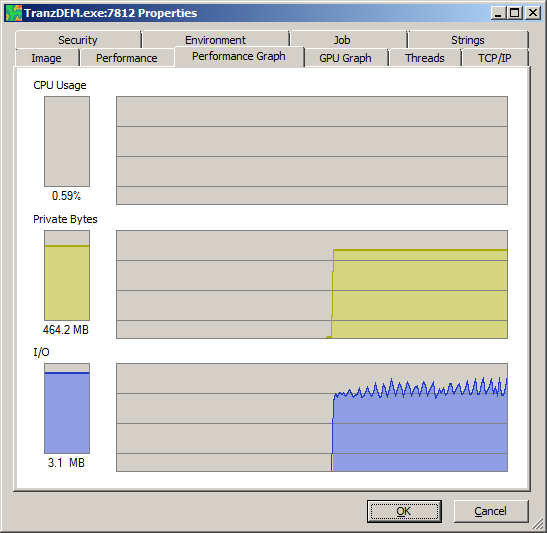
- While reading from adf file, 464MB:
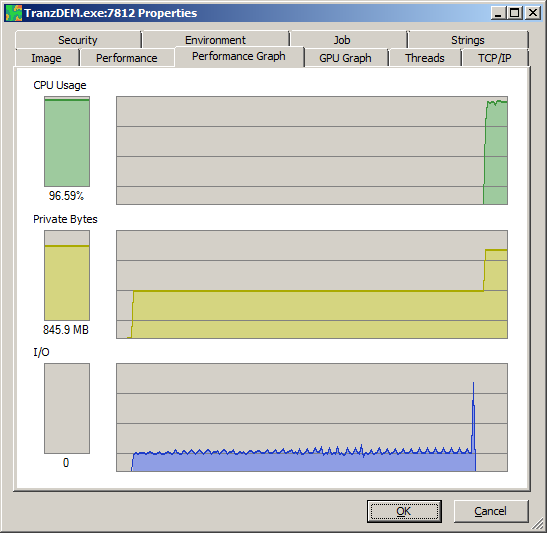
- After grid set to 10m, while converting to UTM, 846 MB
- Conversion finished. Memory of DEM file released, 405 MB
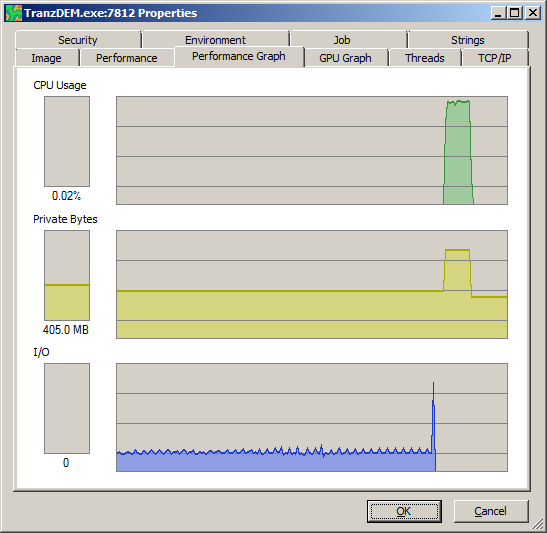
The final DEM in UTM is slightly smaller than the original, because of the lower grid width. But during conversion to UTM, both memory ranges are needed.
Jerker wrote:...the proposed new option for the next release sounds like just the thing that is needed to solve this issue - provided that it is known which part of the DEM data is required for the sub-set...
It will be done by coordinates, lat/long for USGS DEMs, and projected coordinates in meters for others. You can always use pen Street Map to load an overview map into TransDEM, switch to the coordinate system in question and roughly determine the coordinate subrange needed.
Re: ...new issue with National Map downloads...
Posted: 06 Jun 2013 02:20
by Jerker
G'day geophil,
Although I would probably have no need for the program, Roland, I took your advice and downloaded Process Explorer and undertook the exercises you suggested with the following results. These 'logs' are in the same order as yours above, taken under the same conditions, albeit with the data being processed with the "New Grid Width" set to "11" (because I still cannot get it to 'work' at "10" with these files)...


...make of these what you will...
Jerker {:)}
Re: ...new issue with National Map downloads...
Posted: 06 Jun 2013 18:58
by geophil
You clearly stay below the 2GB mark. I don't know why TransDEM refuses to allocate the memory for the 10m grid. I've taken a note to run this on a 32bit system myself and debug it there.
Anyway, the graphs could be helpful to understand how TransDEM works if you are curious. What you see in the diagrams are the three phases of reading a non-UTM DEM in TransDEM and the limiting factors.
In phase 1 TransDEM has allocated memory for the entire DEM file and reads from file into memory. This phase is I/O bound. The CPU is more or less idle (for the TransDEM process). I/O has small dips at regular intervals, because .adf files are organized in blocks and TransDEM reads one block at a time. Memory is stable because all memory for this phase has been allocated before data reading started. The amount of memory to allocate is determined when TransDEM reads the DEM file header, which is is very quick and you will hardly find a footprint of that step in the graphs.
Phase 2 is conversion to UTM. We have memory allocated for the original (file) representation of the DEM and for the UTM representation. This phase is CPU bound. TransDEM parallelizes this conversion, using all available CPU cores. No I/O activity.
Phase 3 is the idle phase waiting for further activity. Conversion is completed, the DEM will be shown in the main window. The memory for the DEM file has been released. No I/O or CPU activity.