Page 1 of 2
Ground textures in TS12 - mini map
Posted: 20 Apr 2013 13:57
by Belgian46
Hello Everybody,
After the installation of SP1 TS12 and hotfix, I started doing some test.
I have some issues with TS12 after installing, but I think I can solve those issues.
I also started doing some test with transdem and now I can create the complete Belgian railwaynet ( see picture ) without having the Taddaemon error after importing a large content file. Whenever I imported a large file ( larger than 550MB I received the Taddaemon error. Now, the file is 1,12Gb and TS12 has no problems with it

.

However, when I create a route with Trandem and import the content into Trainz version 10, I get the following result.

No problem with that.
When I make a route with transdem and import the content into TS12, I get the following result ( and Yes before I create a new map with dem elevations & ground textures, I make sure that the settings are those for TS12

)

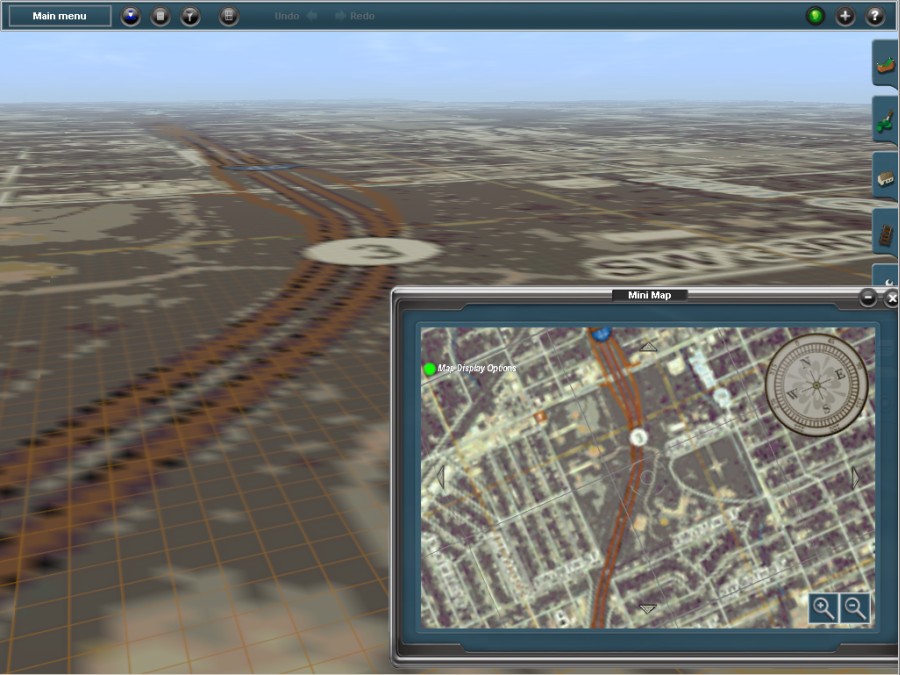
As you can see the textures is visible in the minimap but not in the route.
Any ideas about this feature?
Thank you
Best regards
Kurt
Re: Ground textures in TS12 - mini map
Posted: 20 Apr 2013 14:09
by geophil
Is this a new installation of Trainz 12 for SP1? Did you import the TransDEM textures? (They currently produce warnings with SP1, due to the uniformness of the normals map, which isn't really needed but Trainz insists.)
Re: Ground textures in TS12 - mini map
Posted: 20 Apr 2013 14:26
by Belgian46
Hello Roland,
Thank you for your reply.
The TS12 installation is a backup installation ( which is a fresh TS12 copy + 2 installed routes ( Vosges + Wilsons Mills & Mount Olive ) +
a Belgian AM75 train ).
The Transdem textures V3 are installed.
As you mentioned the transdem textures, my internal light began to flash

In CM I did a search for the transdem textures and found them with yellow warning. I had a closer look and found the following error
Warning: The texture 'normals.tga' is a uniform color.
I had a similar warning with the Belgian AM75 train and had to fix it with PEV tools Image2TGA version 1.2 .
I will use PEV tool and see where it gets me.
As always, will report later.
Best regards
Kurt
Ps - Is it still possible to edit my first post of this topic ? ( made some typos )

Re: Ground textures in TS12 - mini map
Posted: 20 Apr 2013 15:01
by geophil
Are you really sure the TransDEM textures are installed?
I just created this:
It's a clean TS12 installation including SP1.
The texture warnings should be harmless. Nevertheless, I will follow Zec's suggestion how to modify the normal maps to make them fully compliant again without generating unwanted side effects.
Re: Ground textures in TS12 - mini map
Posted: 20 Apr 2013 15:15
by Belgian46
Hello Roland,
Yes, I'm sure - here it is and now without yellow warning after using PEV's tool Image2TGA

but there is also something else
When I scroll away from the ground and reach a higher level, I get this view

Rather confusing .
Best regards
Kurt
Re: Ground textures in TS12 - mini map
Posted: 20 Apr 2013 16:23
by geophil
Have you tried a different route, like the Muengsten example from the tutorials?
Re: Ground textures in TS12 - mini map
Posted: 20 Apr 2013 16:33
by Belgian46
Hello Roland,
I tried it with several routes and I got the same result.
I will have a try with the Muengsten example.
Best regards
Kurt
Re: Ground textures in TS12 - mini map
Posted: 20 Apr 2013 17:43
by Belgian46
Belgian46 wrote:Hello Roland,
I tried it with several routes and I got the same result.
I will have a try with the Muengsten example.
Best regards
Kurt
Hello Roland,
Muengsten tutorials - no luck - same result.
I will take a break - and perhaps the light will flash again
Best regards
Kurt
Re: Ground textures in TS12 - mini map
Posted: 20 Apr 2013 18:33
by geophil
Did you do a Trainz asset database repair after upgrading to SP1? Or did you try to delete the TransDEM textures and reinstall them?
Re: Ground textures in TS12 - mini map
Posted: 21 Apr 2013 15:00
by Belgian46
geophil wrote:Did you do a Trainz asset database repair after upgrading to SP1? Or did you try to delete the TransDEM textures and reinstall them?
Hello Roland,
After installation SP 1 TS12.
I opened Cm, looked if I had some faulty asset. To my suprise, I had none. Could this be true?
Closed down TS12 - restarted it and yes indeed, no faulty assets were present.
I continued my tests with TS12.
Before SP1, I could not create the complete Belgian railwaynet, due to the Taddeamon error after importing a file larger than 550Mb into Trainz. Now a 1,1GB file was no issue for TS12.
Thursday everning, I wanted to continue my test and when I started TS12, the system automatically started looking for deleted assets. In other words, I think a database repair had begun.
I think this phenomenon lasted more than 90 minutes and after finishing the job, the faulty assets popped up.
I had to use PEV tool ( Image2TGA 1.20 ) to repair the errors I had with the Belgian train.
I didn't try to delete the transdem textures, I only did a reinstallation of the transdem textures ( in other words they were overwritten ) and corrected them ( yellow warning Warning: The texture 'normals.tga' is a uniform color with PEV's tool ).
Best regards
Kurt