Page 6 of 7
Re: Norwegian DEM
Posted: 15 Mar 2024 17:47
by geophil
pdw2107 wrote:Should I put it back in its original location?
Yes, I'd recommend that.
pdw2107 wrote:The programme data is under Documnets:
"C:\Users\Peter\Documents\Arkiv (Peter)\TransDem"
That sounds good. Make a new folder underneath "TransDEM", call it "exchange" or "export" or something like that and set this destination in the TransDEM settings as the Trainz Export folder.
Re: Norwegian DEM
Posted: 16 Mar 2024 11:01
by pdw2107
OK, I reinstalled TRS19 using the Trainz installer.
And I have made the "Export" folder:
C:\Users\Peter\Documents\Arkiv (Peter)\TransDem\Export
And then I should try to get the new route again?
Re: Norwegian DEM
Posted: 16 Mar 2024 18:08
by geophil
pdw2107 wrote:And I have made the "Export" folder:
C:\Users\Peter\Documents\Arkiv (Peter)\TransDem\Export
And then I should try to get the new route again?
Yes. Exporting to that location should succeed.
Re: Norwegian DEM
Posted: 17 Mar 2024 10:40
by pdw2107
OK, I carefully followed the Tutorial Part 3, page 47 of TRansDem Trainz edition Release 2.4, and got the following message from TransDem:
Part 1 seemed to work fine (up to page 51, but this message comes after Part 2 completed (pages 51 to 54:
Error writing file "[UTM overlay objects]"
Invalid lat/long location etc.
What to do? ...
Re: Norwegian DEM
Posted: 17 Mar 2024 11:58
by pdw2107
I opened the new route file in TRS2019 which was there with all the subfolders.
The new route opened and seems to be a copy of the DEM, but without the maps..
Re: Norwegian DEM
Posted: 18 Mar 2024 13:00
by geophil
pdw2107 wrote:Error writing file "[UTM overlay objects]"
Invalid lat/long location etc.
That's very strange. It implies, that the route your are trying to export to has not been generated by TransDEM, or it has been altered after its creation.
TransDEM cannot add to this route as its georeferencing is or has become invalid and unknown.
Have you been able to complete the Muengsten tutorial? Did the ground textures appear there? If not, did you import the TransDEM ground texture set?
Re: Norwegian DEM
Posted: 18 Mar 2024 17:21
by pdw2107
geophil wrote:pdw2107 wrote:Error writing file "[UTM overlay objects]"
Invalid lat/long location etc.
That's very strange. It implies, that the route your are trying to export to has not been generated by TransDEM, or it has been altered after its creation.
TransDEM cannot add to this route as its georeferencing is or has become invalid and unknown.
Have you been able to complete the Muengsten tutorial? Did the ground textures appear there? If not, did you import the TransDEM ground texture set?
No, I had the same problem with Muengsten.
Yes I imported the TransDEm textures.
Basically I jest get the DEM to work with. Maybe I could magnify that enough, but its not so good without the maps.
Have others mentioned this problem with TRS2019? Maybe I should go back to TANE?
Its a real puzzle.
Re: Norwegian DEM
Posted: 19 Mar 2024 10:37
by pdw2107
Under the export destination I find that the folders have been created including a TransDem infomation file that says:
TransDEM Trainz Export --- 2006-2015 Roland Ziegler
Geodetic Datum = WGS84
UTMZone = 33V
UTM Southwest Corner Easting = 116960
UTM Southwest Corner Northing = 6886800
UTM Northeast Corner Easting = 207680
UTM Northeast Corner Northing = 6963120
Extension East-West = 90.720 km
Extension North-South = 76.320 km
Trainz World Origin = N 62 14.722' E 8 25.804'
Baseboard UTM Grid Offset: x = 0 m, y = 0 m
# Trainz Baseboards East-West = 126
# Trainz Baseboards North-South = 106
# Trainz Baseboards total = 13356
# actually created Trainz Baseboards after filtering = 1211
Actual Elevation Range Minimum = 0 m
Actual Elevation Range Maximum = 1788 m
Re: Norwegian DEM
Posted: 19 Mar 2024 12:02
by pdw2107
I tried TANE as well. Same result..
Re: Norwegian DEM
Posted: 19 Mar 2024 18:35
by geophil
Let's stick with the Muengsten tutorial. Any other route does not make sense, until Muengsten is working for you.
- When you export in part 1, and before you open the export dialog, does your TransDEM window look like it does in the manual? If not make sure it does:
UTM and baseboard grid visible, DEM loaded, map loaded, vector loaded, rectangle mask set.
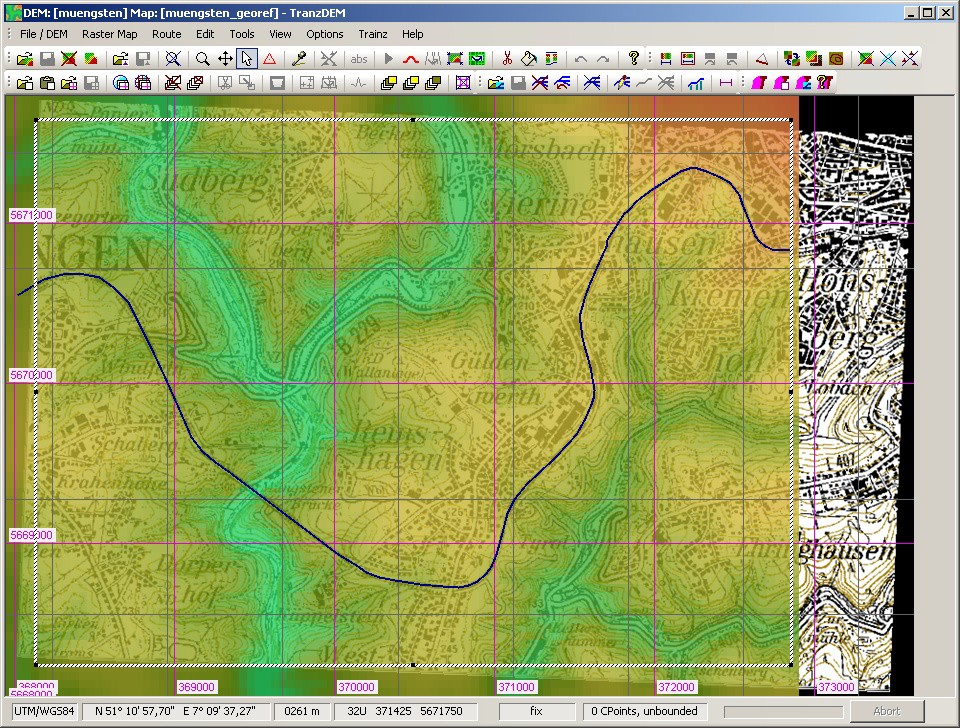
- Export as described in the manual.
- In Trainz Content Manager, delete any previous Muengsten routes, to avoid confusion.
- Then import the new TransDEM export. (Do not add UTM tiles or vectors, yet).
- Open the imported route in Surveyor. Does it have terrain? Does it have ground textures?