Page 2 of 2
Re: Google Earth Images
Posted: 03 Jan 2013 11:23
by geophil
brucemarshall56 wrote: After I unzip the file there are quite a few files, which one should I be using?
Any of the adf files will do. The DEM data consists of the entire directory. TransDEM take care of all the files needed. It's a new format for TransDEM, see step 9 here:
http://forum.transdem.de/viewtopic.php?p=1172#p1172.
Do the DEM and the georef raster maps load separately? Without the other type? Do you have the same coordinates in both?
Check the settings. Main menu: Options | Settings | DEM Display Parameters | DEM Transparency:
"Show transparent must" be checked
The Percentage value must be > 0 and < 100, usually between 20 and 60.
0% means opaque. Raster maps will be hidden behind DEM.
100% means invisible. DEM will not be shown.
brucemarshall56 wrote: I loaded the DEM for the area and it loads with a blank Raster Map from what I can see.
The "Open DEM" function cannot load anything other but DEMs.
brucemarshall56 wrote:The Muengsten tutorial says on page 45 of the manual that we open DEM, Georefenced Raster Map then the Vector Route is that the order they have to be in or does it matter?????
Vectors always have to come last because they need a georef. ratser map or a DEM. DEM and georef. Raster maps can be loaded in any order. The DEM will always be shown in front of georef raster maps, but is semi-transparent by default, see above.
Re: Google Earth Images
Posted: 06 Jan 2013 16:46
by brucemarshall56
Geophil.
Select the "Adjust Height" tool in Trainz Surveyor, position the cursor above a UTM tile, press left mouse button and drag. This should raise or lower the tile.
(In mountainous terrain it may be helpful to create 500 m tiles instead of the default 1000m tiles, because the smaller ones may be easier to handle.)
I have tried the above and still have map tiles "floating" in mid air. I have tried everything in trainz to correct this and nothing works. The procedure I use is I go to
objects and identify the map tile then hit the adjust height button and drag the tile down but they only disappear. What am I doing wrong??
Bruce
Re: Google Earth Images
Posted: 06 Jan 2013 19:23
by geophil
brucemarshall56 wrote:then hit the adjust height button and drag the tile down but they only disappear.
On the initial click the tile may drop to its designated position, which is probably underneath the terrain surface (no idea why it isn't there in the first place). Switch to wire-frame mode in Surveyor and recover the tile by dragging it up again.
Re: Google Earth Images
Posted: 07 Jan 2013 21:05
by brucemarshall56
Geophil,
I have successfully got the height adjustment to where I can adjust the height. My problem is that all the tiles are "floating" and I don't know what height to set them at? I am in wire frame and some of the track is "floating". Is the track supposed to be "floating above the baseboard after the height adjustment? How do I know what height to place the UTM tiles???
Thanks for your help!!!
Bruce
Re: Google Earth Images
Posted: 08 Jan 2013 14:57
by geophil
The UTM tiles are flat, the terrain is not. Therefore there is no ideal vertical position for the UTM tile. It has to be adjusted to the course of the railway line.
When placing track in Trainz Surveyor, the spline points will cling to the terrain surface (by default), not the UTM tile (which is just an ordinary Trainz object, like a house or a tree).
Re: Google Earth Images
Posted: 16 Jan 2013 17:24
by brucemarshall56
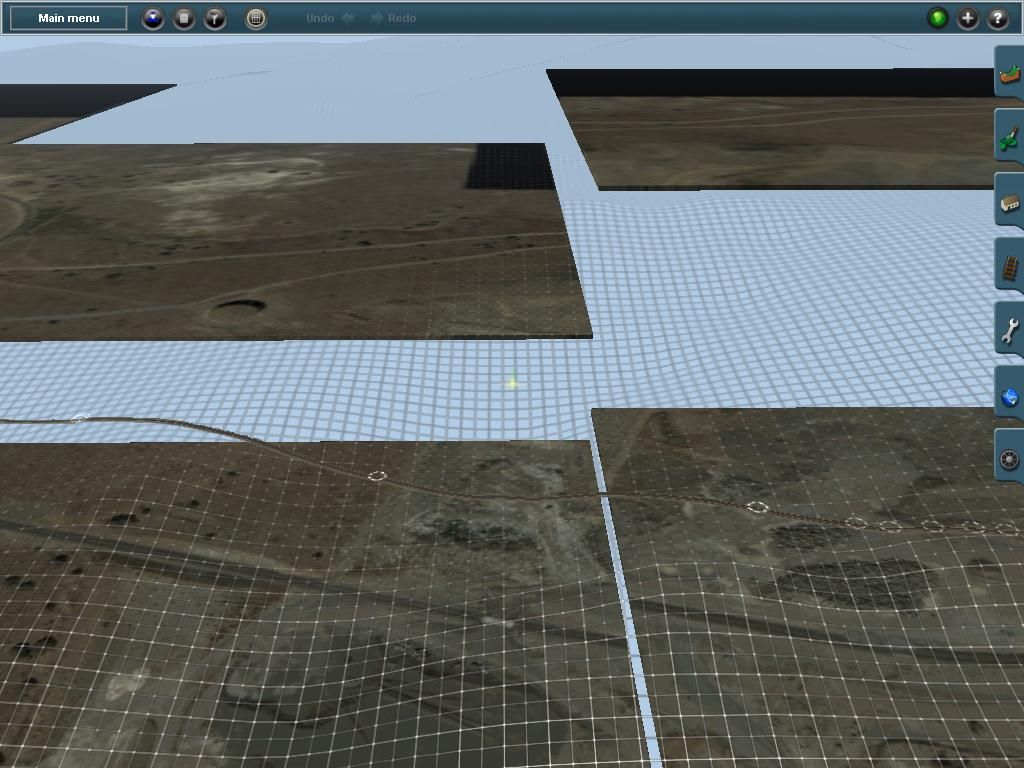
The screenshot below is what I am having trouble with. The screen shot is with trainz in wireframe mode. The baseboards are all at different heights. The track seems to be on top of the wireframe.
I have tried to adjust the height using the Object screen and choosing the UTM # and adjusting the tile up or down, the track never seems to be on the baseboard.
Any help would be appreciated!
Bruce
 edit geophil: removed duplicate img tag
Re: Google Earth Images
Posted: 16 Jan 2013 20:00
by geophil
brucemarshall56 wrote:
I have tried to adjust the height using the Object screen and choosing the UTM # and adjusting the tile up or down, the track never seems to be on the baseboard.
The wireframe represents the terrain. The track splines cling to the terrain as they should do. To adjust the track or to place all the other objects raise or lower the
tile to the terrain for the particular spot you are currently working on. Check object positions from a vertical perspective to avoid parallax error.
edit: tile, not track
Re: Google Earth Images
Posted: 16 Jan 2013 20:57
by brucemarshall56
Geophil,
Thanks for the help! I will play around with it later today.
Bruce