I'm making maps with topographic overlays. When I adding a check to the show route option, I get a bright blue-green line representing the route on the map. Is there a way to change the default color of the route line?
Thanks,
BDWorkshop
Route Line Color
Re: Route Line Color
Sure.
Options | Settings | Routes | Line Color
Or within the editor:
Options | Settings | Routes | Simple Route Editor | Selected | Line color
Options | Settings | Routes | Simple Route Editor | Unselected | Line color
Options | Settings | Routes | Line Color
Or within the editor:
Options | Settings | Routes | Simple Route Editor | Selected | Line color
Options | Settings | Routes | Simple Route Editor | Unselected | Line color
-
BDWorkshop
- Posts: 4
- Joined: 20 Jul 2026 03:39
Re: Route Line Color
If it was that simple, I wouldn't of bothered you with this question. Those setting only seem to change the color of the route path inside Transdem. Unless I'm doing something wrong, I only get a bright blue-green route line after exporting into Trainz.geophil wrote: 28 Jul 2026 17:39 Sure.
Options | Settings | Routes | Line Color
Or within the editor:
Options | Settings | Routes | Simple Route Editor | Selected | Line color
Options | Settings | Routes | Simple Route Editor | Unselected | Line color
-
BDWorkshop
- Posts: 4
- Joined: 20 Jul 2026 03:39
Re: Route Line Color
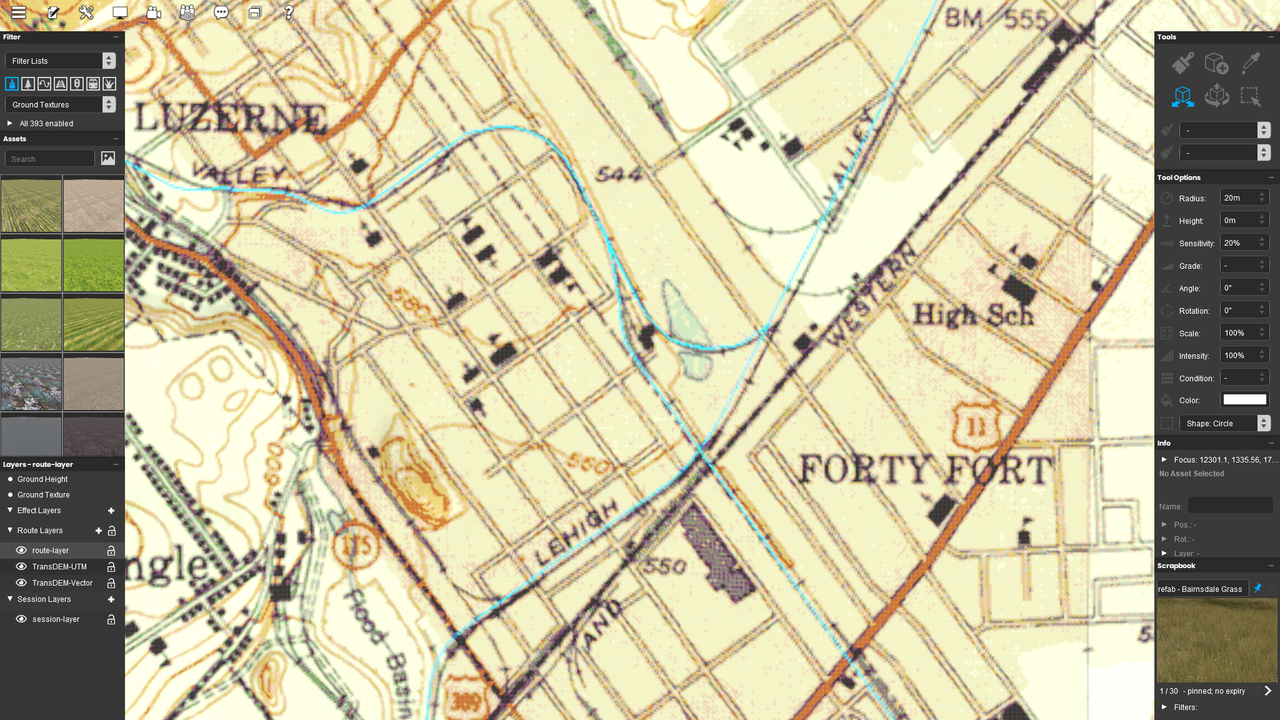
For a test... I set all line colors to red. This is the result.
Re: Route Line Color
I see. I'm afraid on Trainz export the color cyan is hard coded, like magenta for the coord grid. Simply because of the limited color range with ground textures, one of the fundamentals in the Trainz export concept.
-
BDWorkshop
- Posts: 4
- Joined: 20 Jul 2026 03:39
Re: Route Line Color
Ok, Thanks.geophil wrote: 29 Jul 2026 17:00 I see. I'm afraid on Trainz export the color cyan is hard coded, like magenta for the coord grid. Simply because of the limited color range with ground textures, one of the fundamentals in the Trainz export concept.